
- Authors
- Written by :
- Name
- Shrey Dhiman
Engineering Activity Validation Workflow with N8N
- Published on
- Published On:
Manually auditing whether logged hours align with actual code contributions is tedious, error-prone, and doesn't scale. This post walks through a fully automated governance workflow I built using N8N that pulls timesheet data from Google Sheets, fetches GitHub commits, and emails a validation report every Monday — no manual effort required.
Why This Matters
Engineering teams log hours in timesheets, but timesheets alone don't tell the full story. A developer could log 8 hours on a project with zero commits to show for it — or someone might have put in an unusually heavy day that warrants a second look. Rather than relying on managers to spot these patterns manually, this workflow does it automatically and delivers a clean report to stakeholders each week.
Workflow Overview
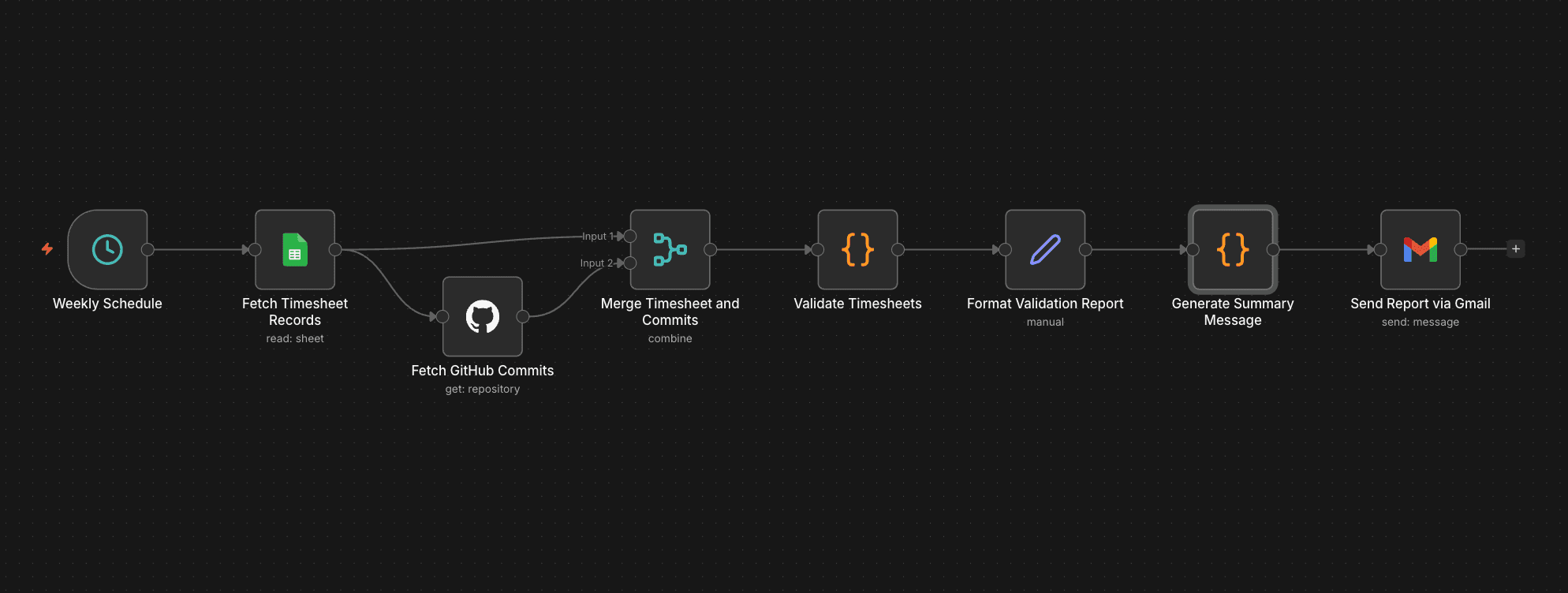
The workflow is made up of 8 nodes and runs end-to-end every Monday morning without any manual intervention.
At a high level, here is what happens:
- A schedule trigger fires at 9:00 AM UTC every Monday
- Two data fetches run in parallel — one pulls the week's timesheet records from Google Sheets, the other retrieves GitHub commits from the target repository
- The results are merged into a single dataset
- A validation code node cross-references hours logged against commit activity and assigns a status to each employee record
- A formatting node reshapes the validated data into clean report rows
- A summary code node builds an HTML email body with totals and a per-employee breakdown table
- Gmail delivers the final report to configured stakeholders
The parallel fetch in step 2 is the only point where two nodes run simultaneously — everything else is strictly sequential, which keeps the data flow easy to follow and debug.
Node-by-Node Breakdown
1. Weekly Schedule — Trigger
Purpose: Automatically kicks off the workflow every Monday at 9:00 AM UTC.
Configuration:
- Trigger type: Schedule
- Cron expression:
0 9 * * 1
This ensures governance checks happen on a consistent cadence without anyone needing to remember to run them.
2. Fetch Timesheet Records — Google Sheets
Purpose: Reads the week's employee timesheet data from a Google Sheets document.
Expected columns in your sheet:
| Column | Description |
|---|---|
| Employee Name | Full name of the employee |
| Work email address | |
| Git Username | GitHub username for commit matching |
| Project | Project or repository name |
| Date | Date of work logged |
| Hours Logged | Number of hours logged that day |
Configuration needed:
- Authenticate with a Google account
- Select the target spreadsheet and sheet name
- Verify column headers match the expected format
Output: An array of timesheet records for the week.
3. Fetch GitHub Commits — GitHub Node
Purpose: Retrieves all commits from the specified repository for the last 7 days.
Runs in parallel with the Timesheet fetch — both nodes execute simultaneously, reducing total run time.
Configuration needed:
- Authenticate with a GitHub account
- Enter the repository owner (e.g.,
your-organization) - Enter the repository name (e.g.,
your-project)
Output: An array of commit objects containing author information and timestamps.
4. Merge Timesheet and Commits — Merge Node
Purpose: Combines the outputs of both fetch nodes into a single unified dataset.
Mode: Append — preserves all records from both sources without dropping any rows.
This creates the foundation the validation logic needs: all timesheet entries alongside all commits, ready to be correlated.
5. Validate Timesheets — Code Node
Purpose: The core of the workflow. Applies governance rules to every timesheet entry.
Validation rules:
| Rule | Condition | Status |
|---|---|---|
| Check Flag | Hours > 10 (regardless of commits) | Check |
| Review Flag | Hours > 6 AND commits = 0 | Review |
| Low Activity | Commits > 0 AND commits < 2 | Low Activity |
| OK | Everything else | OK |
How it works:
- Builds a map of Git usernames → commit counts from the GitHub data
- Iterates over each timesheet entry
- Looks up how many commits that employee made during the logged period
- Applies the rules above and attaches a
validationStatusfield to each record
// Group commits by author username
const commitsByUser = {};

items.forEach(item => {
  const commit = item.json;

  const author = commit.author?.login || commit.commit?.author?.name;
  if (!author) return;

  if (!commitsByUser[author]) {
    commitsByUser[author] = [];
  }

  commitsByUser[author].push(commit);
});

// Now process timesheet rows
return items
  .filter(item => item.json["Employee Name"]) // ensure timesheet rows
  .map(item => {

    const employee = item.json["Employee Name"];
    const gitUser = item.json["Git Username"];
    const project = item.json["Project"];
    const hours = parseFloat(item.json["Hours Logged"] || 0);

    const userCommits = commitsByUser[gitUser] || [];

    const commitCount = userCommits.length;

    let latestCommit = null;
    let totalChanges = 0;

    if (userCommits.length > 0) {
      latestCommit = userCommits[0].commit?.author?.date;

      userCommits.forEach(c => {
        if (c.stats?.total) {
          totalChanges += c.stats.total;
        }
      });
    }

    let status = "OK";

    if (hours > 10) status = "Check";
    else if (hours > 6 && commitCount === 0) status = "Review";
    else if (commitCount > 0 && commitCount < 2) status = "Low Activity";

    return {
      json: {
        employee,
        gitUser,
        project,
        hours,
        commitCount,
        latestCommit,
        totalChanges,
        status
      }
    };
});
Output: Enriched timesheet records with commitCount, latestCommit, totalChanges, and status fields appended.
6. Format Validation Report — Set Node
Purpose: Reshapes each enriched record into a clean, consistent report row.
Fields produced per record:
- Employee Name
- Project
- Hours Logged
- Commit Count
- Validation Status (
Review/Check/OK)
Keeping formatting in a dedicated node means the validation logic stays clean and the report shape can be changed independently.
7. Generate Summary Message — Code Node
Purpose: Produces an executive summary of the week's validation results.
Summary includes:
- Total number of employees validated
- Count of each status: how many are
Review,Check, andOK - HTML-formatted body ready for the email
// Get input data (works if your JSON is incoming items)
const data = items.map(item => item.json);

// Calculate totals
const totalEmployees = data.length;
const totalHours = data.reduce((sum, emp) => sum + (emp["Hours Logged"] || 0), 0);
const totalCommits = data.reduce((sum, emp) => sum + (emp["Commit Count"] || 0), 0);

// Build table rows
const rows = data.map(emp => `
  <tr>
    <td>${emp["Employee Name"]}</td>
    <td>${emp["Project"]}</td>
    <td>${emp["Hours Logged"]}</td>
    <td>${emp["Commit Count"]}</td>
    <td>${emp["Validation Status"]}</td>
    <td>${emp["Last Commit"] || "N/A"}</td>
    <td>${emp["Total Changes"]}</td>
  </tr>
`).join("");

// Build HTML
const html = `
<h2>Daily Work Summary</h2>

<p><strong>Total Employees:</strong> ${totalEmployees}</p>
<p><strong>Total Hours Logged:</strong> ${totalHours}</p>
<p><strong>Total Commits:</strong> ${totalCommits}</p>

<table border="1" cellpadding="8" cellspacing="0" style="border-collapse: collapse;">
  <thead style="background-color:#f2f2f2;">
    <tr>
      <th>Employee Name</th>
      <th>Project</th>
      <th>Hours Logged</th>
      <th>Commit Count</th>
      <th>Validation Status</th>
      <th>Last Commit</th>
      <th>Total Changes</th>
    </tr>
  </thead>
  <tbody>
    ${rows}
  </tbody>
</table>
`;

// Return HTML to next node
return [
  {
    json: {
      html: html
    }
  }
];
8. Send Report via Gmail — Gmail Node
Purpose: Delivers the full report to the configured stakeholders.
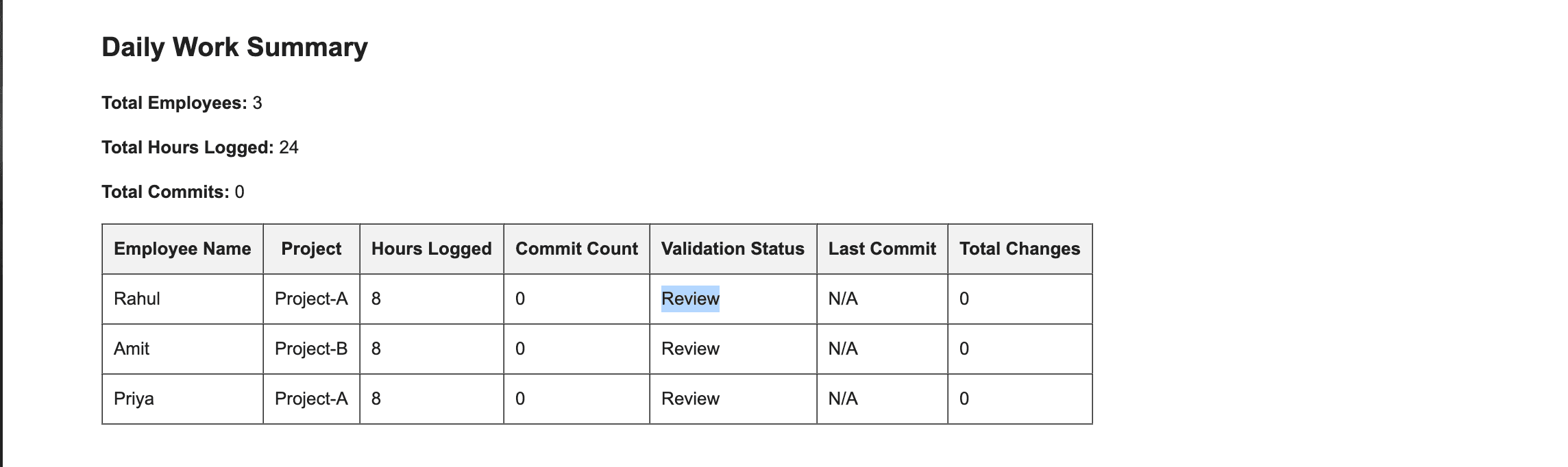
Email contains:
- Subject line with the current date (e.g., Engineering Activity Validation Report — 16 Feb 2026)
- Executive summary in the email body
- Detailed per-employee validation data
Configuration needed:
- Authenticate with a Gmail account
- Enter the recipient email address(es)
Here is a sample of the validation report email that stakeholders receive every Monday:
Setup Checklist
Before the workflow runs successfully, complete these steps:
- Google Sheets Node — Connect Google account, select the spreadsheet and sheet, verify column headers
- GitHub Node — Connect GitHub account, enter repository owner and name
- Gmail Node — Connect Gmail account, enter recipient email address
Future Scope and Possibilities
This workflow is a functional starting point. Its real value is in how far it can be pushed once the foundation is in place.
Richer Data Sources
The current workflow validates hours against commits in a single repository. That's a useful signal, but engineering work spans much more than that:
- Pull request activity — merge frequency, review participation, and time-to-merge tell a richer story than commits alone
- Jira or Linear tickets — correlate logged hours against ticket status to validate that work is tied to deliverables
- CI/CD pipelines — factor in build triggers, deployment activity, and pipeline runs as additional activity signals
- Calendar data — account for meeting-heavy days or company holidays before flagging low commit counts
- Multiple repositories — aggregate commits across all repos an engineer contributes to, not just one
Smarter Validation Rules
The current three-tier system (Check, Review, Low Activity, OK) uses fixed thresholds. Future iterations could make these significantly more intelligent:
- Role-based thresholds — senior engineers, architects, and engineering managers have different expected commit patterns than junior developers
- Sprint-aware rules — validation logic that accounts for sprint phases (planning week vs. delivery week)
- Anomaly detection — instead of static rules, use historical baselines per engineer to flag deviations from their own patterns
- Context-aware flags — weight validation differently for on-call rotations, incident response periods, or internal tooling work
Real-Time Visibility
Weekly Monday reports are a good starting point, but moving toward continuous visibility opens up new possibilities:
- A live dashboard showing current-week validation status per engineer
- Slack or Teams alerts triggered immediately when a threshold is crossed, rather than waiting until Monday
- Manager-facing views that surface trends over time rather than point-in-time snapshots
Historical Benchmarking
By appending each week's results to a persistent Google Sheet or database, the system could power longitudinal analysis:
- Track per-engineer and per-team productivity trends across sprints and quarters
- Identify seasonal workload patterns (e.g., pre-release crunch periods)
- Measure the impact of process changes by comparing validation status distributions before and after
- Build team-level benchmarks that make anomalies easier to detect in context
Organization-Wide Governance
With proper parameterization, the same workflow structure can scale beyond a single team:
- Separate workflow instances per team or business unit, feeding into a consolidated reporting sheet
- A single orchestration layer that runs validations across multiple repositories and teams simultaneously
- Org-wide governance dashboards for engineering leadership, built from the same underlying data
Conclusion
This workflow removes the burden of manual timesheet audits from managers and brings consistent, automated visibility into engineering activity. The four-tier validation system (Check, Review, Low Activity, OK) gives reviewers a clear action priority each week, and the modular node structure means it can be extended or adapted without rewriting any core logic. If you're managing an engineering team and want to bring the same kind of governance to your process, N8N makes it surprisingly approachable — no custom infrastructure needed.