
- Authors
- Written by :
- Name
- Akash Srivastava
Memory Optimization with Arquero: Solving JavaScript Array Overhead
- Published on
- Published On:
The Problem: Memory Overhead of JavaScript Arrays
When building data-intensive web applications, a common pattern is to store data as arrays of objects:
// Traditional approach - array of objects
const data = [
  {
    id: 'record_00001',
    x: 1.234,
    y: 5.678,
    category: 'A',
    value: 42.5,
    // ... more properties
  },
  // ... thousands or hundreds of thousands more objects
]
This works well for small datasets, but creates serious problems at scale:
- Memory Overhead: Each JavaScript object carries metadata overhead (hidden classes, property maps)
- Poor Cache Performance: Objects scattered across memory, causing cache misses
- GC Pressure: Millions of objects create work for garbage collector
- Limited Scalability: Memory usage grows linearly with data size
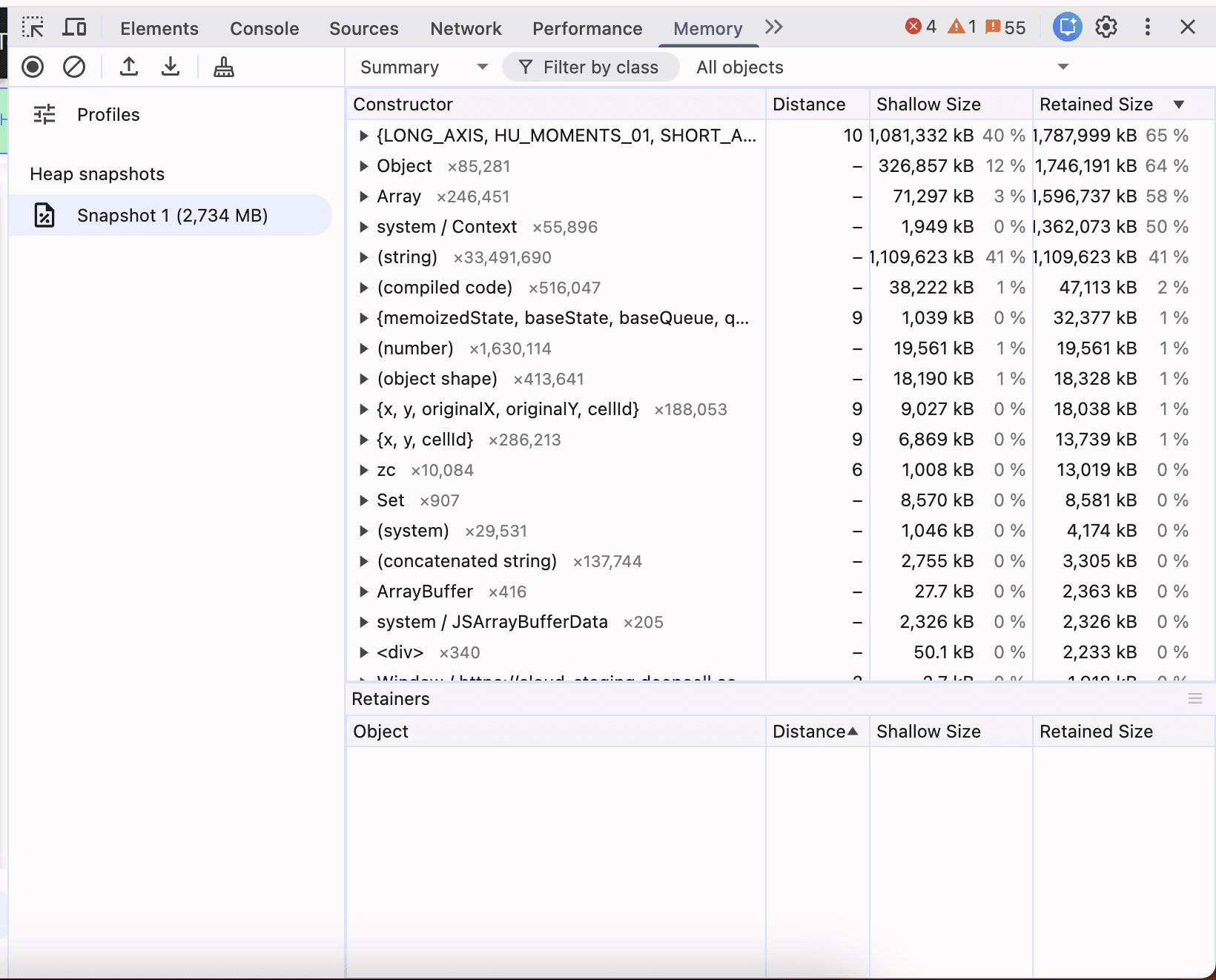
In our case, processing 300,000+ records with 50+ properties each consumed 2.7GB of memory, causing crashes on devices with limited RAM.
The Solution: Columnar Storage with Arquero
What is Apache Arrow?
Apache Arrow is a language-independent columnar memory format designed for efficient data interchange and in-memory analytics. It provides:
- Standardized format: Same data structure across different languages (Python, JavaScript, Java, etc.)
- Zero-copy reads: Data can be shared between processes without serialization
- Optimized layout: Columnar format enables vectorized operations
Why Not Use Arrow Directly?
While Arrow provides excellent memory efficiency, its JavaScript API is low-level and focused on data transport. Working directly with Arrow requires:
// Raw Arrow - verbose and low-level
const table = tableFromIPC(buffer)
const idColumn = table.getChild('id')
const valueColumn = table.getChild('value')

for (let i = 0; i < table.numRows; i++) {
  const id = idColumn.get(i)
  const value = valueColumn.get(i)
  // Manual filtering, aggregation, etc.
}
This is where Arquero comes in.
Why Arquero?
Arquero wraps Apache Arrow with a high-level, SQL-like API for data manipulation. It combines Arrow's memory efficiency with a developer-friendly interface:
// Arquero - expressive and concise
const filtered = dataFrame
  .filter((d) => d.value > 10)
  .select('id', 'value')
  .orderby('value')
Key benefits of Arquero over raw Arrow:
- Familiar SQL-like operations (filter, select, groupby, join)
- Functional transformations without mutation
- Built-in aggregation functions
- Seamless conversion to/from Arrow format
Instead of storing data as an array of objects, data is organized by columns:
// Row-oriented (traditional)
const rowOriented = [
  { id: 1, x: 1.2, y: 5.6, category: 'A' },
  { id: 2, x: 2.3, y: 6.7, category: 'B' },
  // ... thousands more
]

// Column-oriented (Arquero)
const columnOriented = {
  id: [1, 2, ...],           // Int32Array
  x: [1.2, 2.3, ...],        // Float64Array
  y: [5.6, 6.7, ...],        // Float64Array
  category: ['A', 'B', ...]  // String array
}
Why Columnar Storage?
Memory Efficiency:
- No object overhead per row
- Typed arrays (Float64Array, Int32Array) instead of generic objects
- Better compression with binary formats
Performance Benefits:
- CPU cache-friendly access patterns
- SIMD operations on typed arrays
- Efficient column filtering and selection
Developer Experience:
- SQL-like query syntax
- Functional data transformations
- Seamless integration with data visualization libraries
Implementation Guide
1. Installing Arquero
npm install arquero apache-arrow
2. Loading Data from Arrow Format
Apache Arrow provides a compact binary format for data interchange:
import { fromArrow } from 'arquero'
import { tableFromIPC } from 'apache-arrow'

async function loadData(url) {
  // Fetch Arrow binary data
  const response = await fetch(url)
  const arrayBuffer = await response.arrayBuffer()

  // Parse Arrow IPC format
  const arrowTable = tableFromIPC(arrayBuffer)

  // Create Arquero DataFrame
  const dataFrame = fromArrow(arrowTable)

  return dataFrame
}
3. Creating DataFrames from Objects (Migration Path)
If you're migrating existing code, you can create DataFrames from object arrays:
import { from } from 'arquero'

// Convert existing array of objects
const data = [
  { id: 1, value: 10, category: 'A' },
  { id: 2, value: 20, category: 'B' },
]

const dataFrame = from(data)
4. Working with DataFrames
Arquero provides a fluent API for data manipulation:
// Filtering
const filtered = dataFrame.filter((d) => d.value > 10)

// Selecting columns
const subset = dataFrame.select('id', 'category', 'value')

// Grouping and aggregation
const grouped = dataFrame.groupby('category').rollup({
  avg: (d) => op.mean(d.value),
  count: op.count(),
})

// Deriving new columns
const withCalculated = dataFrame.derive({
  ratio: (d) => d.value / d.total,
})
5. Efficient Column Access
For performance-critical operations, extract columns as typed arrays:
// Extract columns once
const ids = dataFrame.array('id')
const values = dataFrame.array('value')
const categories = dataFrame.array('category')

// Fast iteration over columnar data
for (let i = 0; i < ids.length; i++) {
  const id = ids[i]
  const value = values[i]
  const category = categories[i]

  // Process data...
}
Pro Tip: Cache extracted columns to avoid repeated array conversions:
const columnCache = new WeakMap()

function getColumn(dataFrame, columnName) {
  if (!columnCache.has(dataFrame)) {
    columnCache.set(dataFrame, new Map())
  }

  const cache = columnCache.get(dataFrame)

  if (!cache.has(columnName)) {
    cache.set(columnName, dataFrame.array(columnName))
  }

  return cache.get(columnName)
}
Real-World Example: Filtering and Visualization
Here's how to use Arquero for common data processing tasks:
// Load data
const dataFrame = await loadData('/api/data.arrow')

// Filter records
function filterByCategory(dataFrame, categories) {
  return dataFrame.filter((d) => categories.includes(d.category))
}

// Extract coordinates for visualization
function getScatterPlotData(dataFrame) {
  const x = dataFrame.array('x_coordinate')
  const y = dataFrame.array('y_coordinate')
  const colors = dataFrame.array('category')

  return { x, y, colors }
}

// Aggregate statistics
function getStatsByCategory(dataFrame) {
  return dataFrame
    .groupby('category')
    .rollup({
      count: op.count(),
      avgValue: (d) => op.mean(d.value),
      minValue: (d) => op.min(d.value),
      maxValue: (d) => op.max(d.value),
    })
    .objects() // Convert back to array of objects for display
}
Results
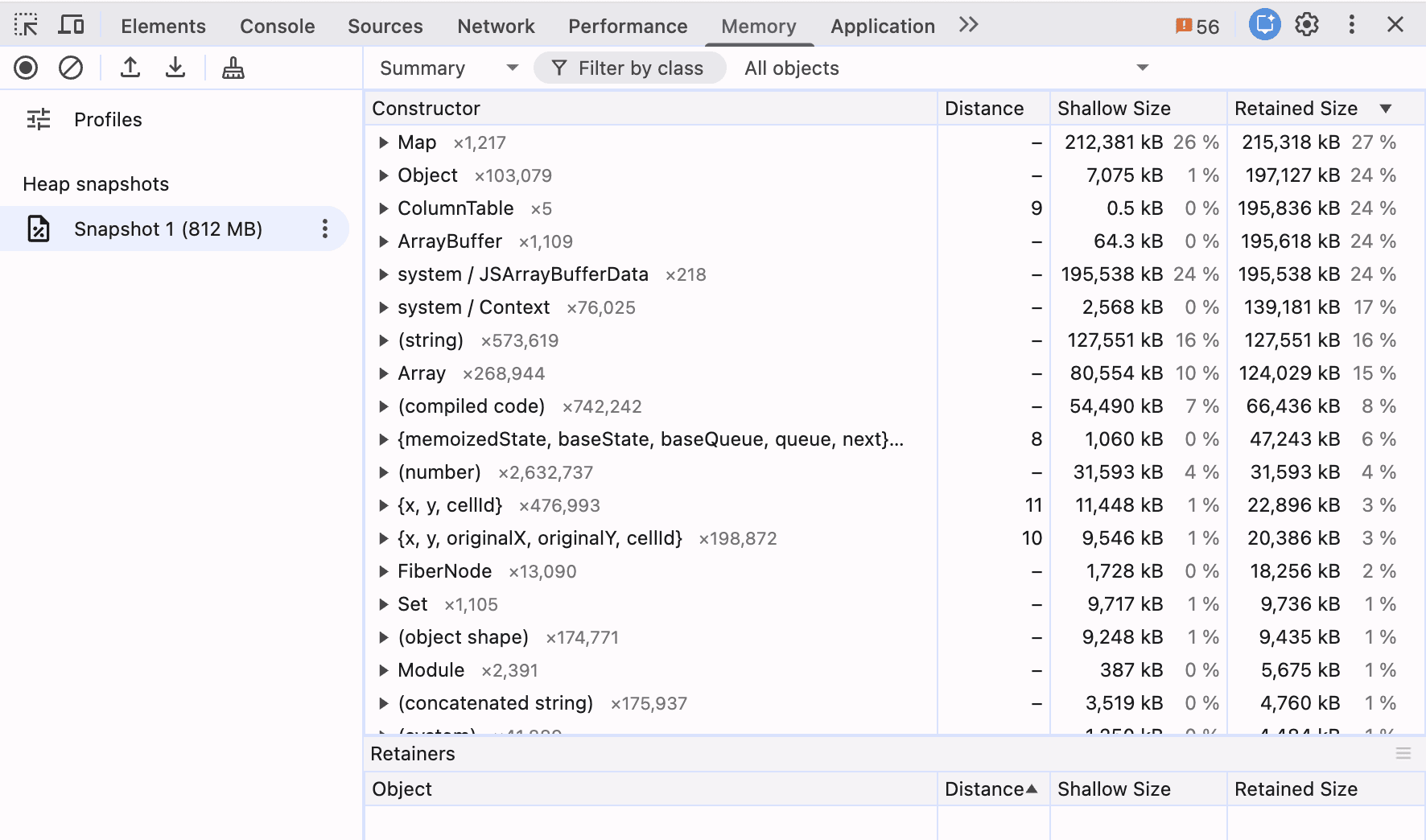
Here's a visual comparison of memory usage before and after optimization:
| Metric | Before (Arrays) | After (Arquero) | Improvement |
|---|---|---|---|
| Memory Usage | 2.7 GB | 812 MB | 70% reduction |
| Load Time | ~3.5s | ~1.2s | 65% faster |
| GC Pauses | Frequent freezes | Smooth | Eliminated |
| Max Records | ~300K | ~1M+ | 3x scalability |
Key Benefits
✅ Eliminated crashes on devices with 4GB RAM ✅ Faster data loading with Arrow binary format ✅ Smoother UI with reduced garbage collection ✅ Better developer experience with query-based API
Best Practices
1. Cache Column Extractions
Extracting columns repeatedly is expensive. Cache them:
// ❌ Inefficient - extracts column on every iteration
for (let i = 0; i < dataFrame.numRows(); i++) {
  const value = dataFrame.array('value')[i]
}

// ✅ Efficient - extract once, reuse
const values = dataFrame.array('value')
for (let i = 0; i < values.length; i++) {
  const value = values[i]
}
2. Use Arrow Format for Data Transfer
Serve data as Arrow IPC instead of JSON:
// Backend (Node.js example)
import { tableToIPC } from 'apache-arrow'

app.get('/api/data', (req, res) => {
  const arrowTable = createArrowTable(data)
  const buffer = tableToIPC(arrowTable)

  res.set('Content-Type', 'application/vnd.apache.arrow.stream')
  res.send(buffer)
})
Benefits:
- Smaller payload: 3-5x smaller than JSON
- Faster parsing: Binary format vs JSON parsing
- Type preservation: No type coercion issues
3. Leverage Arquero's Query API
Instead of manual loops, use Arquero's functional API:
// Instead of manual filtering
const filtered = []
const ids = dataFrame.array('id')
const values = dataFrame.array('value')
for (let i = 0; i < ids.length; i++) {
  if (values[i] > 10) {
    filtered.push({ id: ids[i], value: values[i] })
  }
}

// Use Arquero's query API
const filtered = dataFrame
  .filter((d) => d.value > 10)
  .select('id', 'value')
  .objects()
When Should You Use Arquero?
Arquero is ideal for:
✅ Large datasets (100K+ rows) in the browser ✅ Data-intensive visualizations (charts, plots, heatmaps) ✅ Complex filtering and aggregations ✅ Memory-constrained environments (mobile devices, low-end laptops) ✅ Real-time data streaming (Arrow format support)
Consider alternatives if:
❌ Small datasets (<10K rows) - overhead not worth it ❌ Simple CRUD operations - regular objects are fine ❌ Frequently mutating data - columnar format optimized for reads
Conclusion
Columnar storage with Arquero offers dramatic improvements for data-intensive web applications:
- 70% memory reduction in our production application
- 3x better scalability for large datasets
- Eliminated performance issues on low-end devices
- Better developer experience with query-based API
If you're building data visualization tools, dashboards, or analytics applications that handle large datasets, Arquero and Apache Arrow are worth exploring. The migration effort pays off quickly in improved performance and user experience.
Resources
- Arquero Documentation - Official docs and examples
- Apache Arrow JavaScript - Arrow implementation details
- Observable Notebooks - Interactive examples
- Arquero API Reference - Complete API documentation