
- Authors
- Written by :
- Name
- Shrey Dhiman
Building Super Agent: An AI-Powered System That Automatically Resolves GitHub Issues
- Published on
- Published On:
What if your GitHub issues could fix themselves?
That's the idea behind Super Agent — a multi-agent AI system that monitors your GitHub repositories, analyzes open issues, generates code fixes, reviews them, creates pull requests, and notifies you via email. All without a single manual intervention.
In this blog post, I'll walk through the architecture, the multi-agent pipeline, the AI integration, and the full-stack dashboard that makes it all visible and controllable.
The Problem: Manual Issue Resolution Doesn't Scale
Every engineering team has a backlog of issues — bug reports, small feature requests, code improvements — that pile up faster than the team can address them. For many of these, the fix is straightforward: update a config, handle an edge case, rename an API field. But the overhead of reading the issue, finding the right files, making the change, and creating a PR means even simple fixes take 30+ minutes of developer time.
What if an AI agent could handle this entire workflow autonomously?
That's exactly what Super Agent does.
How It Works: The Multi-Agent Pipeline
Super Agent uses a three-agent architecture where each agent has a distinct responsibility:
| Agent | Role |
|---|---|
| SuperAgent (Orchestrator) | Discovers issues, dispatches workers, coordinates the full run |
| WorkerAgent (Fixer) | Analyzes an issue, identifies target files, generates code fixes, commits to a branch |
| ReviewerAgent (Reviewer) | Reviews the diff, creates a PR, updates labels, sends notifications |
Here's the flow:
- SuperAgent scans your repositories for issues labeled
ai-agent - It labels each issue as
in-progressand dispatches concurrent WorkerAgents - Each WorkerAgent analyzes the issue with AI, generates a fix, and commits it to a
fix/issue-Nbranch - The ReviewerAgent diffs the branch, performs an AI code review, and creates a pull request
- Labels are updated to
ai-pr-createdand an email notification is sent
The Orchestrator: SuperAgent
The SuperAgent class is the entry point. It supports both single-repo and multi-repo modes — it can either target a specific repository or scan all repositories owned by a GitHub user/org.
export class SuperAgent {
  private discoveryClient: GitHubClient
  private ai: AIEngine
  private emailService: EmailService
  private processingRepos = new Set<string>()
  private callbacks?: AgentCallbacks

  async run(): Promise<void> {
    log.info('Super Agent starting a new run...')

    const repos = await this.getTargetRepos()
    log.info(`Targeting ${repos.length} repo(s): ${repos.join(', ')}`)

    for (const repoName of repos) {
      await this.processRepo(repoName)
    }
  }

  private async getTargetRepos(): Promise<string[]> {
    if (config.github.repo) {
      return [config.github.repo]
    }
    return this.discoveryClient.listOwnerRepos()
  }
}
A key design decision is concurrency control. Workers are spawned in batches, with a configurable limit to avoid overwhelming the GitHub API:
private async spawnWorkers(
    issues: GitHubIssue[],
    github: GitHubClient,
    repoName: string,
    runId?: number
): Promise<WorkerResult[]> {
    const maxConcurrent = config.agent.maxConcurrentAgents;
    const results: WorkerResult[] = [];

    for (let i = 0; i < issues.length; i += maxConcurrent) {
        const batch = issues.slice(i, i + maxConcurrent);

        const batchPromises = batch.map(async (issue) => {
            const worker = new WorkerAgent(github, this.ai);
            return worker.processIssue(issue);
        });

        const batchResults = await Promise.allSettled(batchPromises);

        for (const result of batchResults) {
            if (result.status === 'fulfilled') {
                results.push(result.value);
            }
        }
    }

    return results;
}
The use of Promise.allSettled (instead of Promise.all) ensures that a failure in one worker doesn't kill the entire batch. Each issue is processed independently.
The Fixer: WorkerAgent
Each WorkerAgent handles a single issue through a well-defined 7-step pipeline:
- Create a branch from the dev branch (
fix/issue-N) - Fetch the repo tree for full context
- Analyze the issue with AI to identify target files and strategy
- Read the target files from GitHub
- Generate the code fix with AI
- Commit all changes to the branch
- Comment on the issue with a summary of what was done
async processIssue(issue: GitHubIssue): Promise<WorkerResult> {
    const branchName = `fix/issue-${issue.number}`;

    // Step 1: Create a branch from dev
    await this.github.createBranch(branchName, config.github.devBranch);

    // Step 2: Get the repository file tree for context
    const repoTree = await this.github.getRepoTree(config.github.devBranch);

    // Step 3: Analyze the issue with AI
    const analysis = await this.ai.analyzeIssue(
        issue.title, issue.body, repoTree
    );

    // Step 4: Fetch the content of target files
    const fileContents: Record<string, string> = {};
    for (const filePath of analysis.targetFiles) {
        fileContents[filePath] = await this.github.getFileContent(
            filePath, config.github.devBranch
        );
    }

    // Step 5: Generate code fixes
    const changes = await this.ai.generateFix(
        issue.title, issue.body, fileContents, analysis.approach
    );

    // Step 6: Commit all changes to the branch
    await this.github.commitMultipleFiles(fileChanges, branchName,
        `fix(#${issue.number}): ${issue.title}`
    );

    // Step 7: Comment on the issue
    await this.github.addIssueComment(issue.number,
        `🤖 **AI Agent has committed a fix to branch \`${branchName}\`**\n\n` +
        `**Approach:** ${analysis.approach}\n\n` +
        `A reviewer agent will now verify these changes and create a PR.`
    );
}
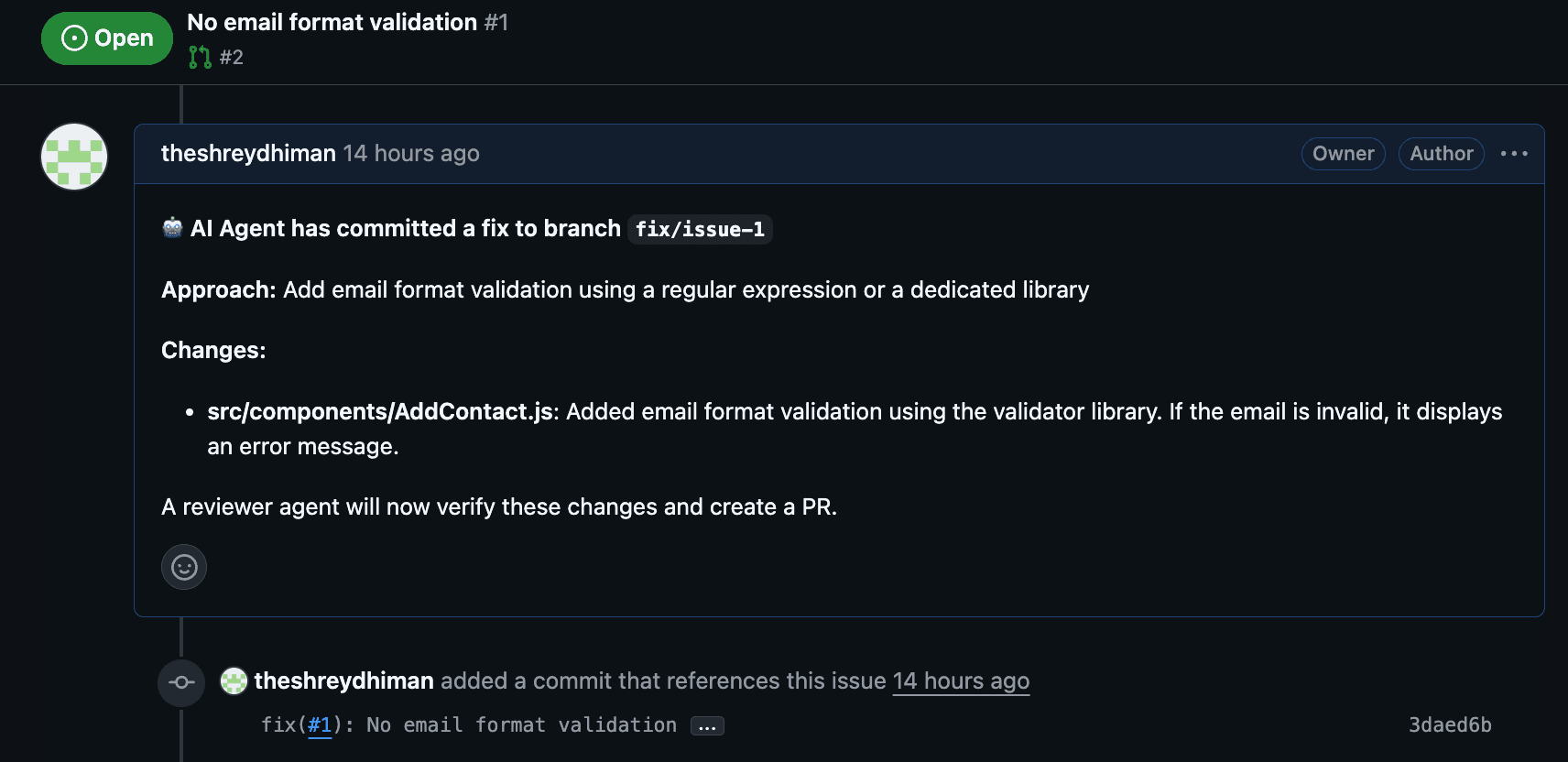
The WorkerAgent also handles errors gracefully — if a fix attempt fails, it comments on the issue explaining the error and returns the issue to the queue for manual review.
The Reviewer: ReviewerAgent
Once workers finish, the ReviewerAgent takes over. It doesn't blindly trust the generated code — it performs an AI-powered code review before creating a PR.
private async reviewAndCreateSinglePR(result: WorkerResult): Promise<ReviewedPR | null> {
    // Step 1: Get the diff between dev and the fix branch
    const diffs = await this.github.compareBranches(
        config.github.devBranch, result.branchName
    );

    // Step 2: Review the changes with AI
    const review = await this.ai.reviewChanges(
        result.issueTitle, null, diffs
    );

    // Step 3: Comment review feedback on the issue
    await this.github.addIssueComment(result.issueNumber, reviewComment);

    // Step 4: Generate PR description
    const prBody = await this.ai.generatePRDescription(
        result.issueTitle, result.issueNumber, diffs
    );

    // Step 5: Create the PR
    const pr = await this.github.createPullRequest(
        result.branchName, config.github.devBranch,
        `fix(#${result.issueNumber}): ${result.issueTitle}`, prBody
    );

    // Step 6: Update labels
    await this.github.removeLabel(result.issueNumber, 'in-progress');
    await this.github.addLabel(result.issueNumber, 'ai-pr-created');
}
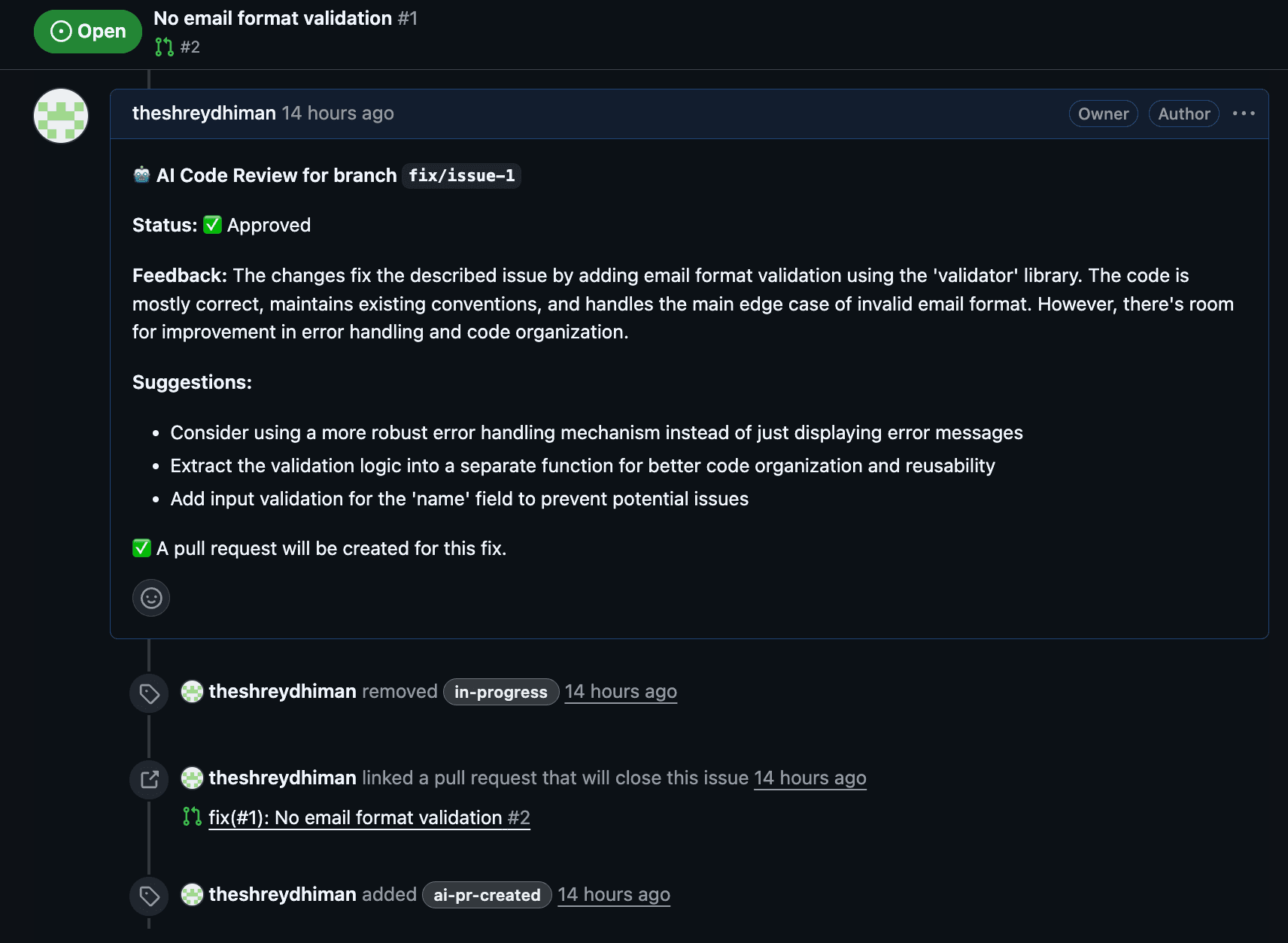
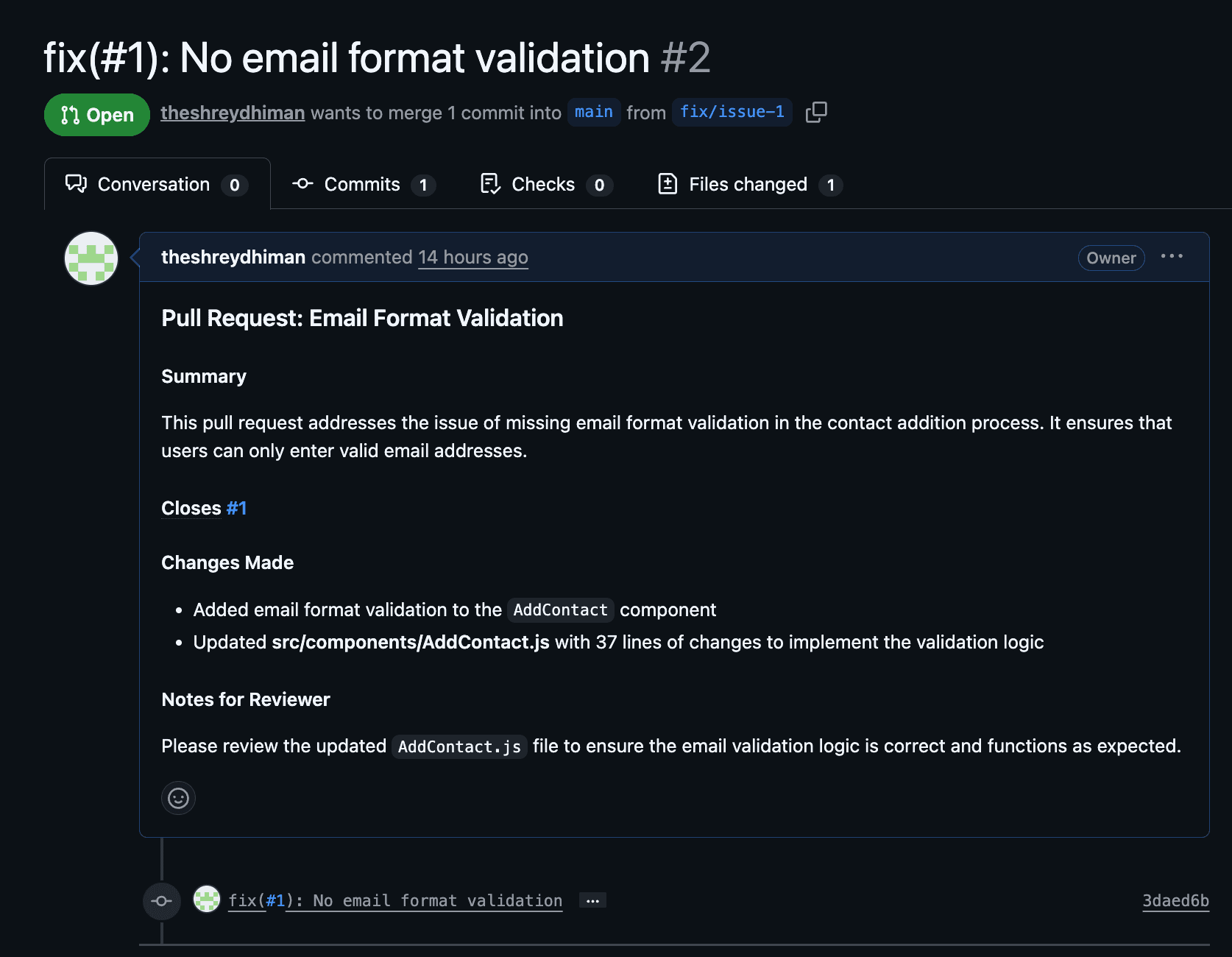
The review provides structured feedback — approval status, suggestions, and a quality assessment. Even if the review flags concerns, the PR is still created (with the suggestions noted) so that a human engineer can make the final call.
The AI Engine: Multi-Provider Support
One of the most powerful design decisions is that Super Agent is not locked to a single AI provider. The AIEngine class abstracts away the provider behind a unified callLLM interface:
export class AIEngine {
  private provider: 'gemini' | 'openai' | 'claude' | 'groq'

  constructor() {
    this.provider = config.aiProvider

    if (this.provider === 'openai') {
      this.openai = new OpenAI({ apiKey: config.openai.apiKey })
    } else if (this.provider === 'groq') {
      this.openai = new OpenAI({
        apiKey: config.groq.apiKey,
        baseURL: 'https://api.groq.com/openai/v1',
      })
    } else if (this.provider === 'claude') {
      this.anthropic = new Anthropic({ apiKey: config.claude.apiKey })
    } else {
      this.genAI = new GoogleGenerativeAI(config.gemini.apiKey)
    }
  }
}
The AI engine serves three distinct purposes in the pipeline:
| Function | Temperature | Purpose |
|---|---|---|
analyzeIssue() | 0.2 | Identify which files to modify and plan the approach |
generateFix() | 0.2 | Generate the actual code changes |
reviewChanges() | 0.3 | Review the diff for correctness and quality |
Low temperatures (0.2–0.3) keep the output deterministic and focused — you don't want creative hallucinations when generating production code.
The Dashboard: Full Visibility and Control
Super Agent includes a React dashboard built with Vite and Tailwind CSS that gives you full visibility into the agent's activity.
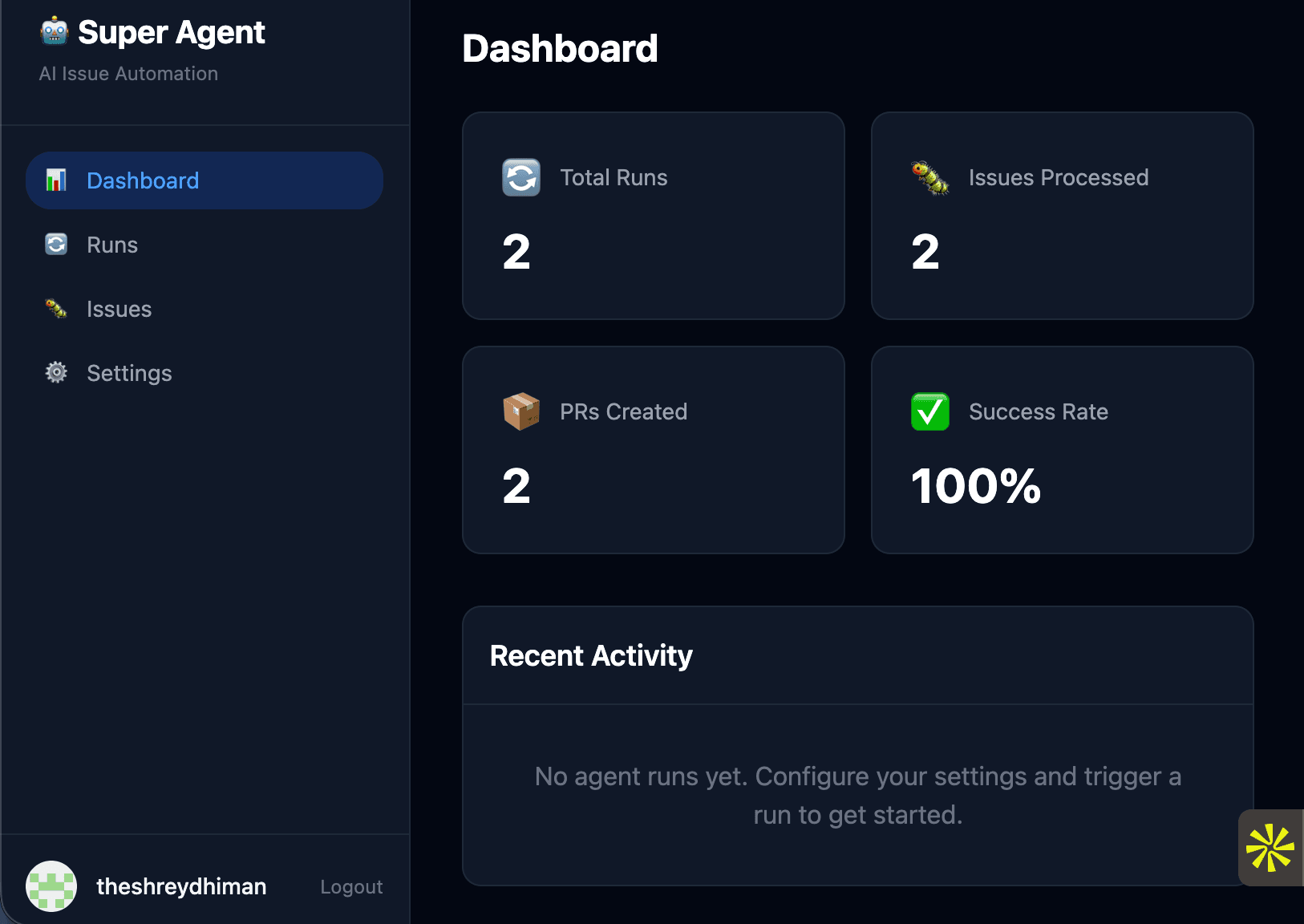
Issues Page — Live GitHub Integration
The Issues page pulls live data from GitHub and merges it with processing status from the database. This means you see every open issue with the ai-agent label, along with its current processing state.
export default function IssuesPage() {
  const [statusFilter, setStatusFilter] = useState('')
  const [fixingIssues, setFixingIssues] = useState<Set<string>>(new Set())

  const { data, loading, refetch } = useFetch<{
    issues: GitHubIssue[]
    total: number
  }>('/api/issues')

  const handleFix = async (issue: GitHubIssue) => {
    const key = `${issue.repo_name}-${issue.issue_number}`
    setFixingIssues((prev) => new Set(prev).add(key))
    try {
      await apiFetch('/api/runs/trigger', {
        method: 'POST',
        body: JSON.stringify({ repo: issue.repo_name }),
      })
      refetch()
    } catch (err: any) {
      alert(`Failed to trigger fix: ${err.message}`)
    }
  }

  // ... renders table with status badges, PR links, and "Fix" buttons
}
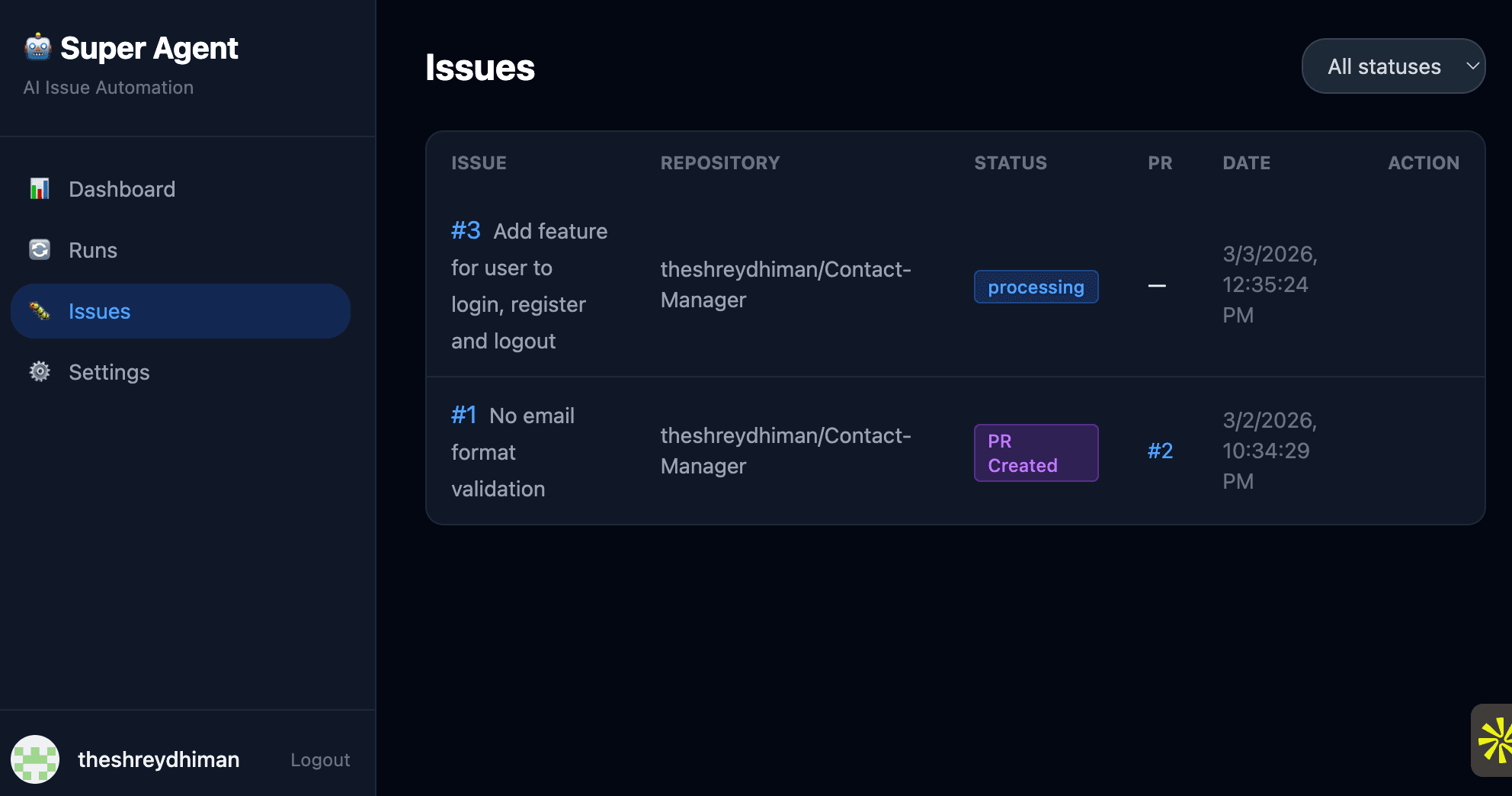
Each issue shows:
- Its GitHub issue number and title (linked to GitHub)
- The repository it belongs to
- A color-coded status badge (Pending, Working, Processing, Success, Failed, PR Created)
- A link to the created PR (if one exists)
- A "Fix" button to manually trigger the agent on that specific issue
Runs Page — Execution History
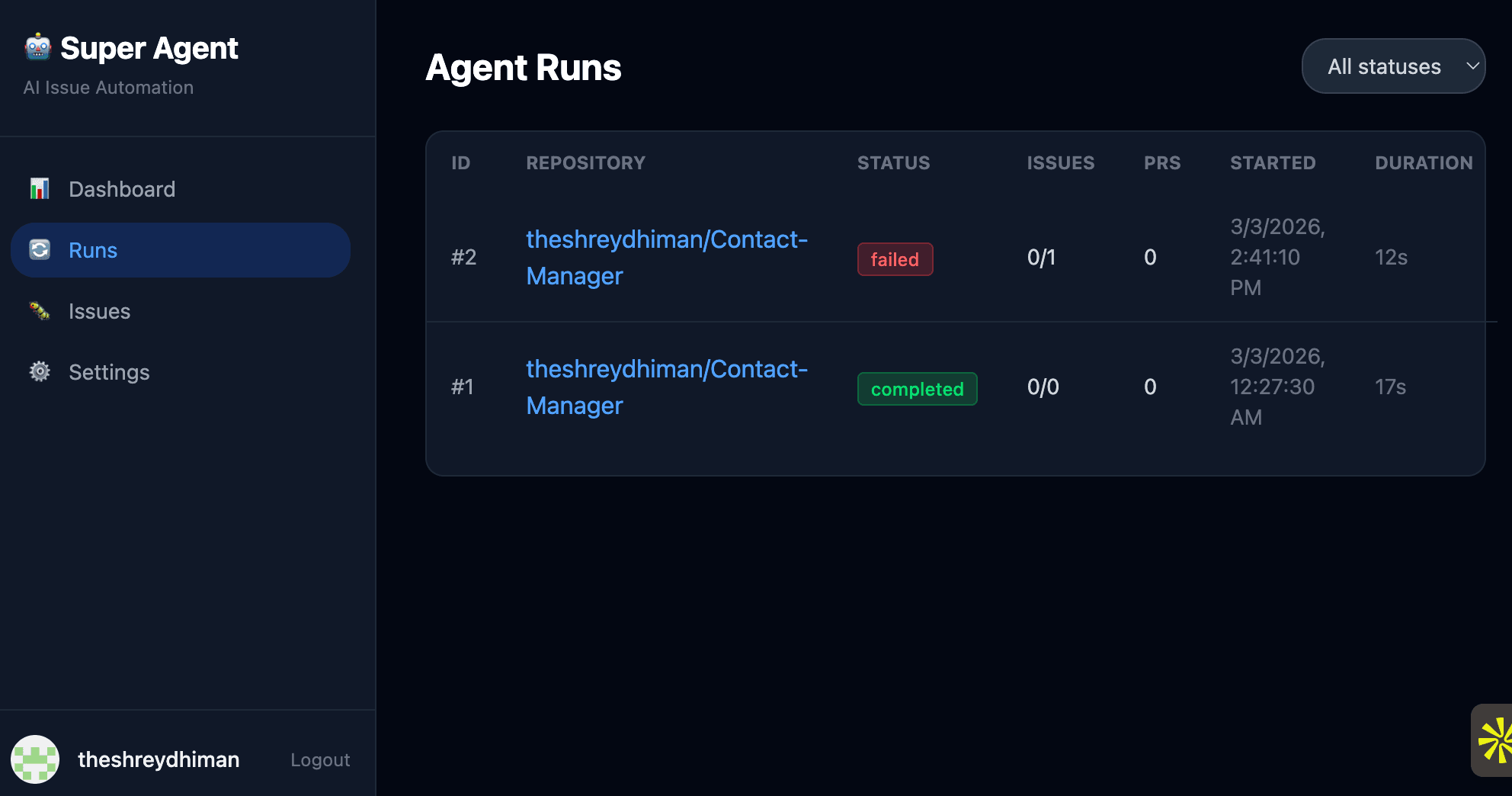
Database Design: Tracking Everything
Super Agent uses MySQL to persist all agent activity. The schema tracks four key entities:
-- Agent execution runs
CREATE TABLE IF NOT EXISTS agent_runs (
    id INT AUTO_INCREMENT PRIMARY KEY,
    user_id INT NOT NULL,
    repo_owner VARCHAR(255) NOT NULL,
    repo_name VARCHAR(255) NOT NULL,
    status ENUM('running', 'completed', 'failed') NOT NULL DEFAULT 'running',
    issues_found INT DEFAULT 0,
    issues_processed INT DEFAULT 0,
    prs_created INT DEFAULT 0,
    error_message TEXT,
    started_at TIMESTAMP DEFAULT CURRENT_TIMESTAMP,
    completed_at TIMESTAMP NULL
);

-- Per-issue tracking
CREATE TABLE IF NOT EXISTS processed_issues (
    id INT AUTO_INCREMENT PRIMARY KEY,
    run_id INT NOT NULL,
    issue_number INT NOT NULL,
    issue_title VARCHAR(512) NOT NULL,
    status ENUM('processing', 'success', 'failed') NOT NULL DEFAULT 'processing',
    branch_name VARCHAR(255),
    pr_number INT,
    pr_url VARCHAR(512),
    review_approved BOOLEAN,
    error_message TEXT
);
This gives you a complete audit trail: which issues were processed, which runs succeeded or failed, which PRs were created, and whether the AI review approved the changes.
Authentication: GitHub OAuth
The dashboard uses GitHub OAuth for authentication. Users log in with their GitHub account, and the app stores their access token (encrypted) to interact with the GitHub API on their behalf.
This means each user can connect their own repositories and trigger agent runs on their own issues — making Super Agent a viable multi-tenant platform.
Key Design Decisions
Why Multi-Agent Instead of a Single Agent?
Separation of concerns. The Worker Agent focuses on understanding the problem and generating correct code. The Reviewer Agent focuses on quality assurance. This mirrors how real engineering teams work — the person who writes the code isn't the same person who reviews it.
Why Promise.allSettled Over Promise.all?
Resilience. If one issue fails to process, the others should still succeed. Promise.allSettled ensures that a crash in one worker doesn't cascade to the entire batch.
Why Support Multiple AI Providers?
Flexibility and cost optimization. Gemini offers a generous free tier for experimentation. Groq provides fast inference with Llama models for free. OpenAI and Claude offer the highest quality for production use. Teams can start with free providers and upgrade as needed.
Why MySQL Over PostgreSQL or SQLite?
MySQL was chosen for production readiness with session storage support (express-mysql-session). The schema uses proper foreign keys, indexes, and enums for data integrity.
What's Next
Super Agent is actively evolving. Here's what's on the roadmap:
- Real-time streaming — WebSocket/SSE to show agent progress live in the dashboard
- Self-validation — Run tests before creating PRs to verify that fixes actually work
- Agent memory — Learn from past successes and failures to improve future fixes
- Multi-file reasoning — Handle complex issues that require coordinated changes across many files
- CI/CD integration — Wait for CI checks to pass and auto-merge approved PRs
- GitLab/Bitbucket support — Extend beyond GitHub to other platforms
Conclusion
Super Agent demonstrates that AI agents are not just chatbots — they can be autonomous systems that perform real engineering work. By combining a multi-agent architecture, multi-provider AI support, GitHub API integration, and a full-stack monitoring dashboard, I've built a system that can take an issue from "opened" to "PR created" in minutes.
The code is modular, the providers are swappable, and the dashboard gives you full control. Whether you want to automate your entire backlog or selectively trigger fixes on specific issues, Super Agent puts the power in your hands.
The future of software engineering isn't about replacing developers — it's about giving them AI-powered teammates that handle the routine work so they can focus on what matters.